AI-selected highlights
ClipThemAll detects the strongest moments in your long video and turns them into short clips.

AI removes the hours of searching. Upload a podcast, interview, webinar or long video to find strong moments, create vertical videos with or without face tracking, or cut by count, duration or custom timestamps.
No subscription · Price estimate before payment · Secure online processing
The editor gives you control over the final cut.
ClipThemAll detects the strongest moments in your long video and turns them into short clips.
Get multiple ready-to-download clips from one source video.
Get videos for TikTok, Instagram Reels and YouTube Shorts.
Cut your video by selected start and end times when you already know the exact moments you need.
Turn long-form content into short social media clips without manual editing.
Start with AI-generated clips, finish with full control in the desktop editor. Use either product separately, or combine them in one workflow.
Upload a video file or provide a supported video link.
Create AI-selected clips, convert video to vertical format, or cut it by count, duration or timestamps.
See the final price before payment. Confirm your order and let ClipThemAll process the video.
Download the results from your account or continue refining them in our desktop editor.
Download the generated clips and continue refining them in our desktop editor for Windows.
Add AI-generated clips or your own footage.
Trim, split, arrange and control audio.
Save the finished result as an MP4 file.
This calculator covers online AI processing only. The price depends on video length, resolution and selected processing options. The desktop editor is priced separately at $5 for 3 months after the free 7-day trial.
We work with all the most popular video file formats: MP4, MOV, AVI, MKV, and WEBM.
The total time depends on the video length and the current queue, and the status is always visible in your account.
The completed files become available directly inside your order after processing is finished.
Yes. In Video Cutting mode, you can select manual timestamps and create clips using your own start and end points.
Your files are processed only for your order and delivered through your account. Payments are handled through secure online payment providers.
ClipThemAll helps turn long videos into short clips for social media. Upload podcasts, interviews, webinars, online courses or YouTube videos and create ready-to-publish clips with AI-assisted highlight selection.
You can choose full AI clip creation or vertical video conversion only. You can also use Video Cutting to split a source video by number of clips, by selected duration or by manual timestamps when you already know the exact moments you need. The price depends on video length, resolution and selected processing options, so you can estimate the cost before creating an order. No subscription is required. ClipThemAll uses a pay-per-video model, so you only pay for the videos you process.
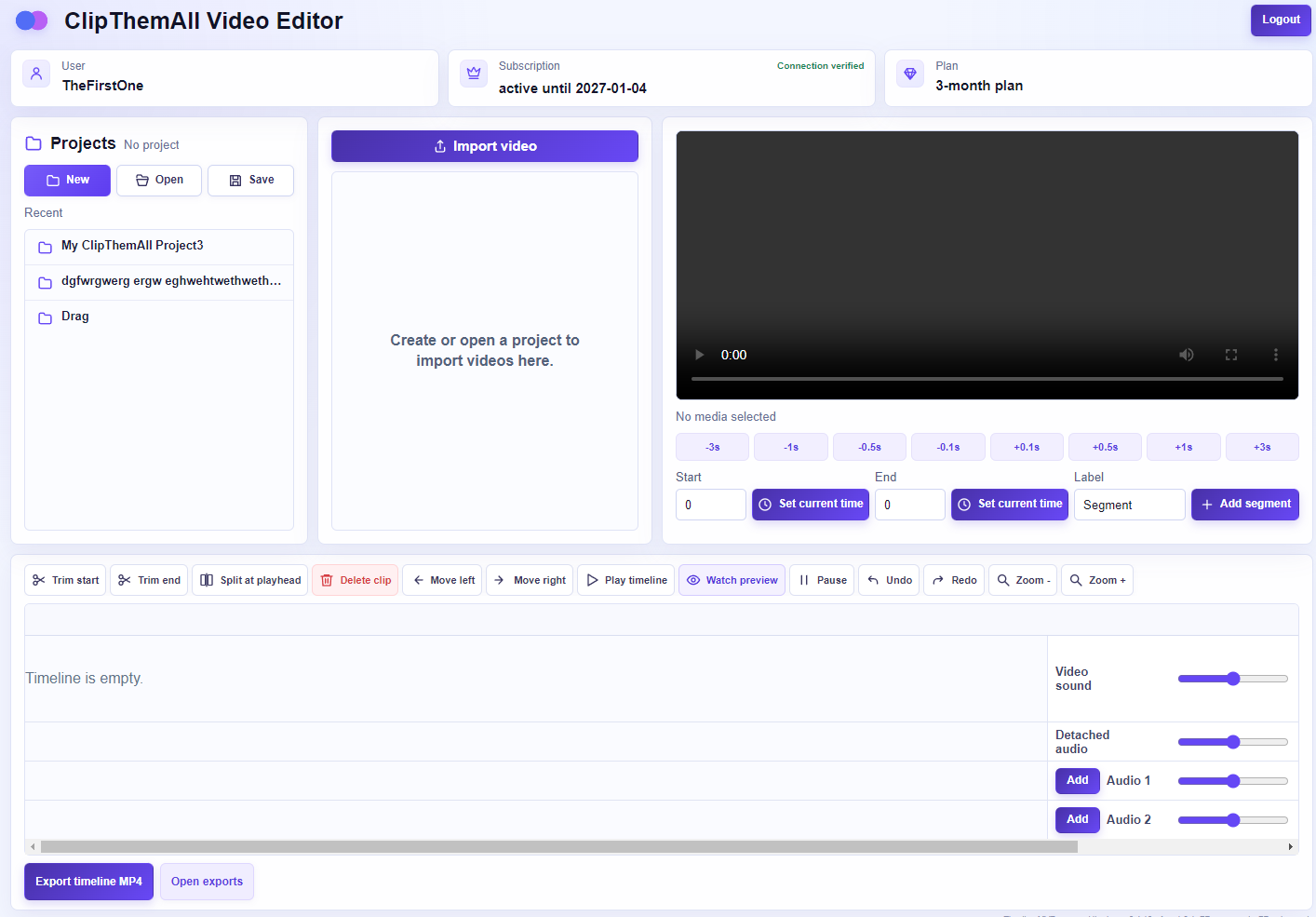
ClipThemAll Video Editor is a practical Windows video editor for content creators who need to prepare short and medium-length videos without a complicated professional workflow. Create local projects, import source videos, trim unwanted parts, split footage at the playhead and arrange clips in the required order on a clear visual timeline.
The editor combines video clips with detached audio tracks, individual volume controls, timeline preview and MP4 export in one focused workspace. Local project storage protects ongoing work from temporary connection loss, while account authorization verifies access to the editor. A free 7-day trial starts after the first download, making ClipThemAll an affordable and technically accessible choice for quickly producing author videos, social media clips, interviews, lessons and other everyday content.
Select how you want your video processed and get an instant price estimate before creating an account.
AI clip creation finds the strongest moments in your video and creates a package of short clips.
You will be able to add your own timestamp ranges after uploading the video. The system will return ready-cut fragments based on your selected time ranges.
This is a preliminary estimate. The final price will be confirmed before payment after your video details are checked. No subscription — you pay only for the selected video processing.